
Follow along, made for your fingertips
Mark the row you're on and count as you go, with a little click for each stitch if you like. Two-finger tap to undo, pencil-only drawing in the tatting and knot editors, and a dark mode for dim rooms.
My knitting pattern studio
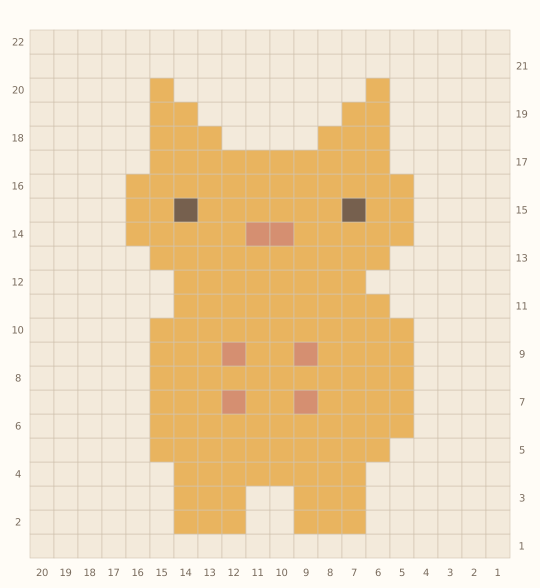
Write the pattern in the set format, and the chart draws itself.

Try it
Purliko doesn't keep the chart, the written pattern and the symbol list apart. They're three views of one pattern, so changing one changes the others. Edit a written pattern in its set format and the chart follows too.
Tap a square to change its color
| 1RS | (16) | × 16 | |
|---|---|---|---|
| 2WS | (16) | × 16 | |
| 3RS | (16) | A× 4, B× 8, A× 4 | |
| 4WS | (16) | A× 3, B× 10, A× 3 | |
| 5RS | (16) | A× 2, B× 5, A× 2, B× 5, A× 2 | |
| 6WS | (16) | A× 2, B× 12, A× 2 | |
| 7RS | (16) | A× 2, B× 2, A, B× 6, A, B× 2, A× 2 | |
| 8WS | (16) | A× 2, B× 12, A× 2 | |
| 9RS | (16) | A× 3, B× 10, A× 3 | |
| 10WS | (16) | A× 3, B× 2, A× 6, B× 2, A× 3 | |
| 11RS | (16) | A× 3, B, A× 8, B, A× 3 | |
| 12WS | (16) | × 16 |
Written to chart works for patterns in the set format: knitting, crochet and Tunisian, knitted colorwork, and tatting shorthand. This demo runs on the same code as the studio.
Knitting and crochet, cross stitch, beads, card weaving and tatting, on a tablet or in any browser. Count your stitches, join the pieces, then print it or follow along on screen.
Knitting, crochet and Tunisian. Round, oval and hexagon motifs, amigurumi and dolls, cuff-down socks, a drop-shoulder sweater worked out from your measurements (neck shaping included), and multiple sizes.

Cross stitch, diamond painting and beading (peyote, with brick in beta). Up to 500 × 500 squares and 30 colors.

Band weaving, card weaving and inkle (with Baltic pick-up).

Tatting, bobbin lace and macramé.

Chart, written pattern and key together
Lay out the pieces and draw the seams

Print across pages (or save as PDF from your browser's print dialog), with the key, or as SVG and PNG. Color charts can add a measured schematic

Mark the row you're on and count as you go, with a little click for each stitch if you like. Two-finger tap to undo, pencil-only drawing in the tatting and knot editors, and a dark mode for dim rooms.
Your patterns are saved on this device and never sent to a server. Keep them as .purliko files, carry your whole library to another device as one file, and once it's loaded, the studio opens without a connection.
Clearing your browser data clears your patterns too, so save the ones that matter as files. The studio reminds you when it's been a while.
$0
The foot of an exported patternpurliko.com
Price coming soon
If your subscription ends, everything you've made still opens and exports as files.
Yes. Nearly every feature is free; only the number of patterns your library holds is limited. Free exports carry a small Purliko mark (purliko.com) in the header or footer, never over the pattern. Opening pattern files is never limited. For more patterns or exports without the mark, there's Pro.
On this device, inside the browser, never on our servers. Export a pattern file (.purliko) or your whole library as one file to move them to another device.
The iPad and Android apps and the web studio are all on the way. Once the web studio opens, use it in the browser on your tablet or computer. Add it to your home screen and it opens like an app.
Once it's loaded, it opens without a connection.
Yes. Written patterns in Purliko's set format turn into charts (knitting, crochet and Tunisian, knitted colorwork, tatting shorthand). It can't read free-form text or patterns from elsewhere as they are.
It can't turn a PDF into a chart. You can convert a photo into a color chart, or lay an image underneath to trace.
It's on the way. We'll open it once accounts are ready.
Yes. The copyright in what you make with Purliko is always yours. Patterns made on the free plan can be sold as long as the Purliko mark (the icon and purliko.com) stays on them; Pro patterns can be sold without it. If you use someone else's pattern or photo, their rights still apply.
Email support@purliko.com.
Yes. Patterns saved on this device are cleared with it. Save the ones that matter as pattern files or a library backup file; the studio reminds you when it's been a while.
It opens in a computer browser too. It's made for tablet screens, so a phone may feel cramped.